
In today’s digital world, students, teachers, and professionals need quick and easy tools to create documents. Word Online Free has become one of the most popular solutions for writing, editing, and formatting documents without installing software. Word Online Free allows users to work directly from their browser, making document creation simple and accessible from anywhere.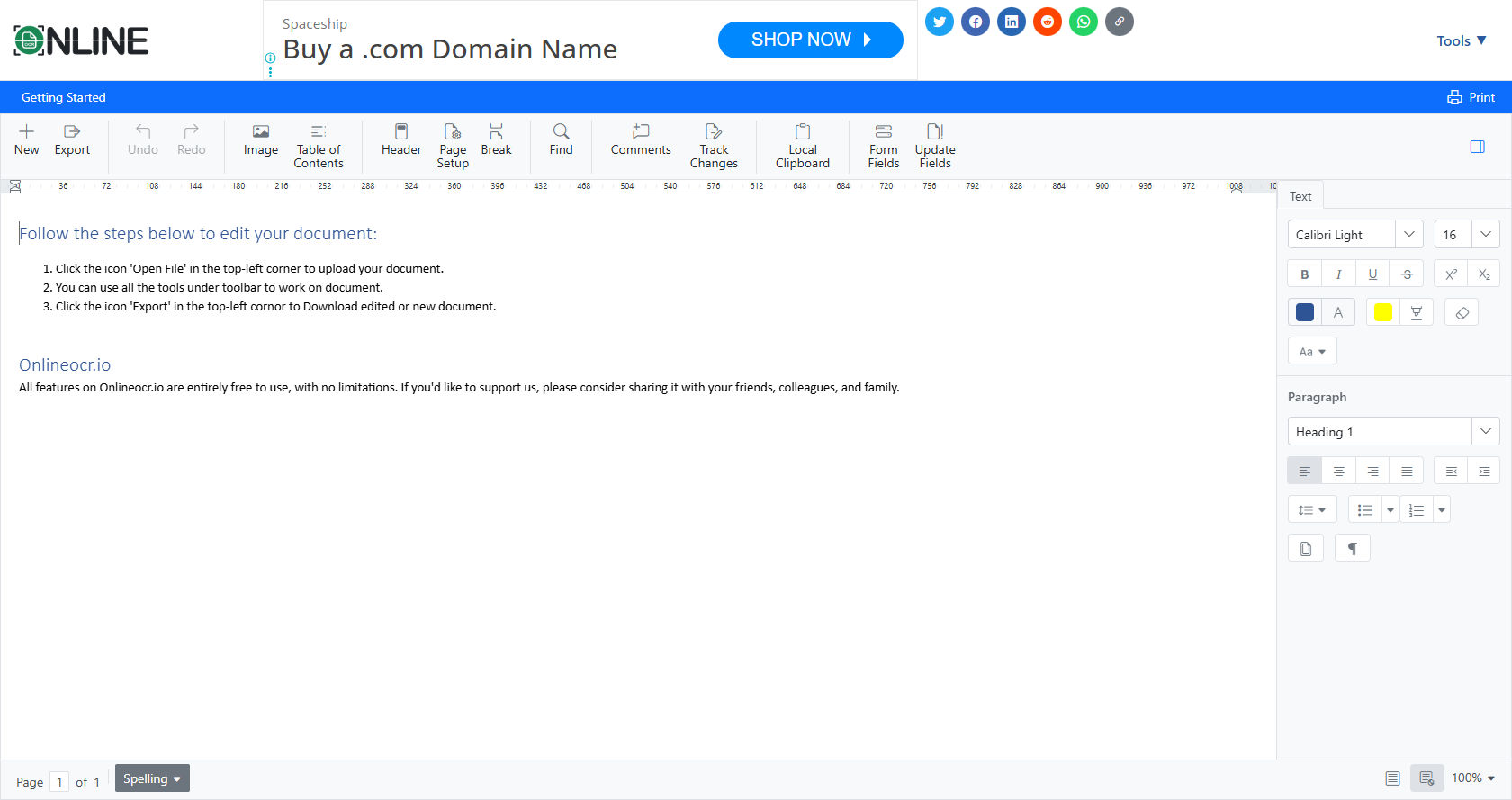
Whether you are preparing a school assignment, writing a resume, or collaborating on a group project, Word Online Free offers powerful features through its template editor.
This guide explains in detail how Word Online Free works, how to use its template editor, and how to make the most of its features.
By the end of this comprehensive guide, you will understand exactly how Word Online Free functions and how it can improve your productivity.
Understanding Word Online Free
Word Online Free is a web-based version of Microsoft Word that runs directly in your internet browser. Unlike traditional desktop software, Word Online Free does not require installation. You simply log in through your browser and start working.
Because Word Online Free operates in the cloud, your documents are automatically saved online. This means you can access them from any device with internet access. Students especially benefit from Word Online Free because it works on laptops, tablets, and even smartphones.
Another major advantage of Word Online Free is real-time collaboration. Multiple users can edit the same document at the same time. This makes group projects easier and more efficient.
What Is the Template Editor in Word Online Free?
The template editor in Word Online Free is a built-in feature that allows users to start documents using pre-designed layouts. Templates are ready-made document formats created for specific purposes.
For example, Word Online Free provides templates for:
-
Resumes
-
Reports
-
Letters
-
Newsletters
-
Flyers
-
School projects
Instead of starting with a blank page, users can choose a template and customize it. The template editor in Word Online Free makes this process simple and user-friendly.
How Word Online Free Works in the Browser
Word Online Free works entirely through cloud technology. When you open Word Online Free, your browser connects to Microsoft’s servers. All editing actions happen online, not on your computer’s hard drive.
Here is a simple breakdown of how Word Online Free works:
-
You sign in using a Microsoft account.
-
You choose to create a new document or select a template.
-
Word Online Free loads the editor interface in your browser.
-
Every change you make is automatically saved.
-
Your document is stored securely in cloud storage.
This automatic saving feature is one of the strongest benefits of Word Online Free. You do not need to worry about losing work due to power outages or crashes.
Getting Started with Word Online Free
Starting with Word Online Free is easy and takes only a few steps.
First, open your web browser. Then, go to the Microsoft Office website and sign in. Once logged in, choose Word Online Free from the available apps.
After opening Word Online Free, you will see options such as:
-
Blank document
-
Template gallery
-
Recent documents
Selecting the template gallery allows you to explore different document designs. This is where the template editor in Word Online Free becomes useful.
Exploring the Template Gallery
The template gallery in Word Online Free offers a wide variety of document designs. These templates are organized into categories to make browsing easier.
Some popular categories include:
-
Business
-
Education
-
Personal
-
Events
-
Letters
-
Creative
Each template in Word Online Free is professionally designed. When you select a template, it opens in the editor so you can modify it according to your needs.
Using templates in Word Online Free saves time because the formatting is already done for you.
Customizing Templates in Word Online Free
Once you select a template, the editing process begins. The template editor in Word Online Free allows full customization.
You can change:
-
Text content
-
Font style
-
Font size
-
Colors
-
Images
-
Page layout
-
Margins
-
Headers and footers
The toolbar at the top of Word Online Free contains formatting tools similar to the desktop version. Even though Word Online Free is browser-based, it still provides strong editing capabilities.
For example, if you choose a resume template in Word Online Free, you can replace sample text with your own information. You can also adjust font colors to match your personal style.
Editing Tools Available in Word Online Free
The editing tools in Word Online Free are simple yet powerful. They are designed to be easy enough for beginners while still useful for advanced users.
Some key tools include:
Text Formatting Tools
Word Online Free allows you to bold, italicize, underline, and highlight text. You can also adjust alignment and spacing.
Insert Features
With Word Online Free, you can insert:
-
Tables
-
Pictures
-
Links
-
Shapes
-
Icons
Layout Options
The template editor in Word Online Free includes page orientation, margins, and column settings.
Although Word Online Free may not have every advanced feature of the desktop version, it provides more than enough tools for most everyday tasks.
Real-Time Collaboration in Word Online Free
One of the most impressive features of Word Online Free is collaboration.
When working in Word Online Free, you can share your document with others. They can view, comment, or edit the file depending on the permission settings.
As multiple people type in Word Online Free, you can see their changes instantly. This real-time editing makes teamwork more efficient.
For students working on assignments together, Word Online Free eliminates the need to email documents back and forth.
Automatic Saving and Cloud Storage
Word Online Free automatically saves your work every few seconds. This feature is extremely helpful.
Because Word Online Free saves files in the cloud, you never have to click “Save” manually. If your internet connection drops, Word Online Free reconnects and keeps your progress safe.
Cloud storage also allows you to access Word Online Free documents from any device. You can start writing on a school computer and finish at home.
Advantages of Using Word Online Free
There are many benefits to using Word Online Free.
No Installation Required
Word Online Free works entirely in the browser. You do not need to download or install anything.
Free Access
As the name suggests, Word Online Free is available at no cost with a Microsoft account.
Device Compatibility
Word Online Free works on Windows, macOS, and even Chromebooks.
Easy Sharing
Sharing documents through Word Online Free is simple and fast.
Template Variety
The template editor in Word Online Free offers ready-made designs for many purposes.
These advantages make Word Online Free an excellent choice for students and professionals.
Limitations of Word Online Free
Although Word Online Free is powerful, it does have some limitations.
-
Some advanced formatting tools are only available in the desktop version.
-
Offline editing is limited unless you sync files.
-
Large or complex documents may load slower in Word Online Free.
However, for most basic writing and editing tasks, Word Online Free is more than sufficient.
Step-by-Step Guide to Using the Template Editor
Let’s look at a detailed step-by-step example of using Word Online Free.
Step 1: Sign In
Open your browser and sign in to Word Online Free using your Microsoft account.
Step 2: Choose a Template
Click on the template gallery inside Word Online Free. Browse categories and select one that fits your purpose.
Step 3: Open the Template
The selected template opens inside the Word Online Free editor.
Step 4: Replace Placeholder Text
Edit the sample content with your own information.
Step 5: Customize Design
Use formatting tools in Word Online Free to change fonts, colors, and layout.
Step 6: Share or Download
Once finished, you can download the file or share it directly from Word Online Free.
This process shows how simple and effective Word Online Free can be.
Using Word Online Free for School Projects
Students benefit greatly from Word Online Free. The template editor helps create structured reports, essays, and presentations.
For example, if you need to submit a research paper, Word Online Free provides academic templates with title pages and headings already formatted.
Teachers also use Word Online Free to create worksheets and lesson plans.
Because Word Online Free supports collaboration, students can work together on group assignments easily.
Using Word Online Free for Business Tasks
Professionals can also use Word Online Free for business needs.
Common uses include:
-
Writing reports
-
Creating proposals
-
Drafting letters
-
Designing simple marketing materials
The template editor in Word Online Free includes professional layouts that save time.
Small business owners especially appreciate Word Online Free because it reduces costs while maintaining professional document quality.
Security and Privacy in Word Online Free
Security is an important concern when using online tools. Word Online Free uses secure cloud storage systems to protect user data.
Documents created in Word Online Free are private unless shared. You control who can view or edit your files.
Microsoft regularly updates Word Online Free to improve safety and performance.
Comparing Word Online Free to Desktop Word
Many users wonder how Word Online Free compares to the desktop version.
Word Online Free:
-
Works in the browser
-
Is free
-
Offers automatic saving
-
Provides collaboration tools
Desktop Word:
-
Requires installation
-
Includes advanced features
-
Works offline
For everyday tasks, Word Online Free is often enough. For advanced formatting or complex publishing, the desktop version may be better.
Tips for Getting the Most Out of Word Online Free
To use Word Online Free effectively, follow these tips:
-
Use templates to save time.
-
Organize files into folders.
-
Share links instead of sending attachments.
-
Regularly review formatting before downloading.
-
Use comments for collaboration.
These strategies help maximize productivity with Word Online Free.
Common Problems and Solutions
Sometimes users experience minor issues in Word Online Free.
Slow Internet
Because Word Online Free runs online, a slow connection can affect performance. Make sure you have stable internet.
Formatting Differences
Occasionally, documents may look slightly different when downloaded. Always preview before printing.
Login Issues
If you cannot access Word Online Free, check your Microsoft account credentials.
Most issues with Word Online Free are easy to fix.
Future of Word Online Free
As cloud technology continues to grow, Word Online Free will likely become even more powerful.
Future improvements may include:
-
More advanced formatting tools
-
Improved offline access
-
Faster performance
-
Expanded template options
Word Online Free is already a strong platform, but it continues to evolve.
Why Word Online Free Is Ideal for Beginners
For 12th-grade students and beginners, Word Online Free is simple to understand.
The interface is clean and easy to navigate. The template editor guides users step-by-step. Because Word Online Free works in the browser, there are fewer technical complications.
This makes Word Online Free perfect for learning document design and formatting skills.
Conclusion
Word Online Free has transformed how people create and edit documents. By combining cloud technology, automatic saving, and real-time collaboration, Word Online Free provides a flexible and reliable writing platform.
The template editor in Word Online Free makes document creation faster and easier. Instead of starting from scratch, users can select professionally designed templates and customize them.
Students use Word Online Free for assignments and group projects. Professionals rely on Word Online Free for reports and business communication. Its accessibility, cost-free model, and cloud-based storage make Word Online Free a practical solution for modern document needs.
Although Word Online Free has some limitations compared to desktop software, its benefits outweigh its drawbacks for most users. It is easy to use, widely accessible, and constantly improving.
If you are looking for a simple yet powerful tool to create documents online, Word Online Free is an excellent choice. By understanding how Word Online Free works and how to use its template editor effectively, you can boost your productivity and create professional-quality documents with confidence.